Add-on Log 1.0.0
- Seller XenByAndrew
- Creation date
Logs add-on install, uninstall, upgrade, rebuilding, enable, and disable

Take control of your XenForo installation with the Add-on Log, a powerful tool for tracking all changes to your add-ons. From updates to enabling or disabling actions, this add-on provides a detailed record to help administrators maintain a clear history of their add-ons' lifecycle.
With intuitive logs and advanced filters, the Add-on Log simplifies troubleshooting, auditing, and managing your add-ons. Whether you’re identifying conflicts or keeping track of updates, this tool ensures efficient and streamlined administration.
With intuitive logs and advanced filters, the Add-on Log simplifies troubleshooting, auditing, and managing your add-ons. Whether you’re identifying conflicts or keeping track of updates, this tool ensures efficient and streamlined administration.
Overview Releases (1)
Take control of your XenForo installation with the Add-on Log, a powerful tool for tracking all changes to your add-ons. From updates to enabling or disabling actions, this add-on provides a detailed record to help administrators maintain a clear history of their add-ons' lifecycle.
With intuitive logs and advanced filters, the Add-on Log simplifies troubleshooting, auditing, and managing your add-ons. Whether you’re identifying conflicts or keeping track of updates, this tool ensures efficient and streamlined administration.
Key Features:
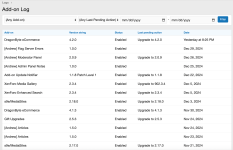
- Detailed Logging: Track all significant changes to your add-ons, including updates, enable/disable actions, and more. Every log entry is displayed in an easy-to-read table.
- Each log entry includes:
- Add-on: Name of the add-on.
- Version String: The version of the add-on at the time of the change.
- Status: Whether the add-on is enabled or disabled.
- Last Pending Action: The most recent action taken, such as "install," "upgrade," or "rebuild", and "uninstall".
- Date: When the change occurred.
- Filters
- Add-on: Search by the add-on name.
- Last Pending Action: Filter by actions like updates or status changes.
- Date Range: Focus on changes within a specific timeframe.
Why Choose This Add-On?
- Troubleshoot With Ease: Use the log to identify potential add-on-related errors or conflicts by pinpointing changes that align with reported issues.
- Track Update History: Maintain a clear record of when updates were uploaded or add-ons were enabled/disabled for auditing and troubleshooting.
- Simplify Administration: Gain a holistic view of your add-ons’ lifecycle to streamline management and support decisions.
